Rental inspections, on the record
Move-in inventories, signed properly.
Walk the property on your phone, grade every feature, attach dated photos, take signatures on the spot — and leave with the report already sent. Twelve months later, inspect the same list again.
- Works offline
- Signatures on the device
- Same-day PDF reports
- Español e inglés
We set up your team and load your area catalogue with you.
PROPERTY / 01842
MOVE-IN INVENTORY
- Property
- 14 Calle Reforma
Col. Juárez, CDMX - Unit
- Apt 3B
- Date & time
- 12 Mar 2026
10:42 CST - Inspected by
- A. Morales
- Tenant
- J. Reyes
- Status
- Complete
- Tenant signed
By the numbers
- inspections recorded
- 8,400+
- report, sent from the phone
- Same day
- basements, stairwells, rural lets
- Offline
- down to the condition labels
- ES / EN
The problem
“It was already like that.”
Disputes happen when there is no clear record. Right now yours is spread across four places, and none of them is signed.
-
Scattered photos
-
Handwritten notes
-
Text messages
-
Lost in email
Alto keeps one record instead.
- Dated and time-stamped
- Filed by area and feature
- Signed by the tenant
- Ready as a report the same day
The move-out
See it clearly. Prove it easily.
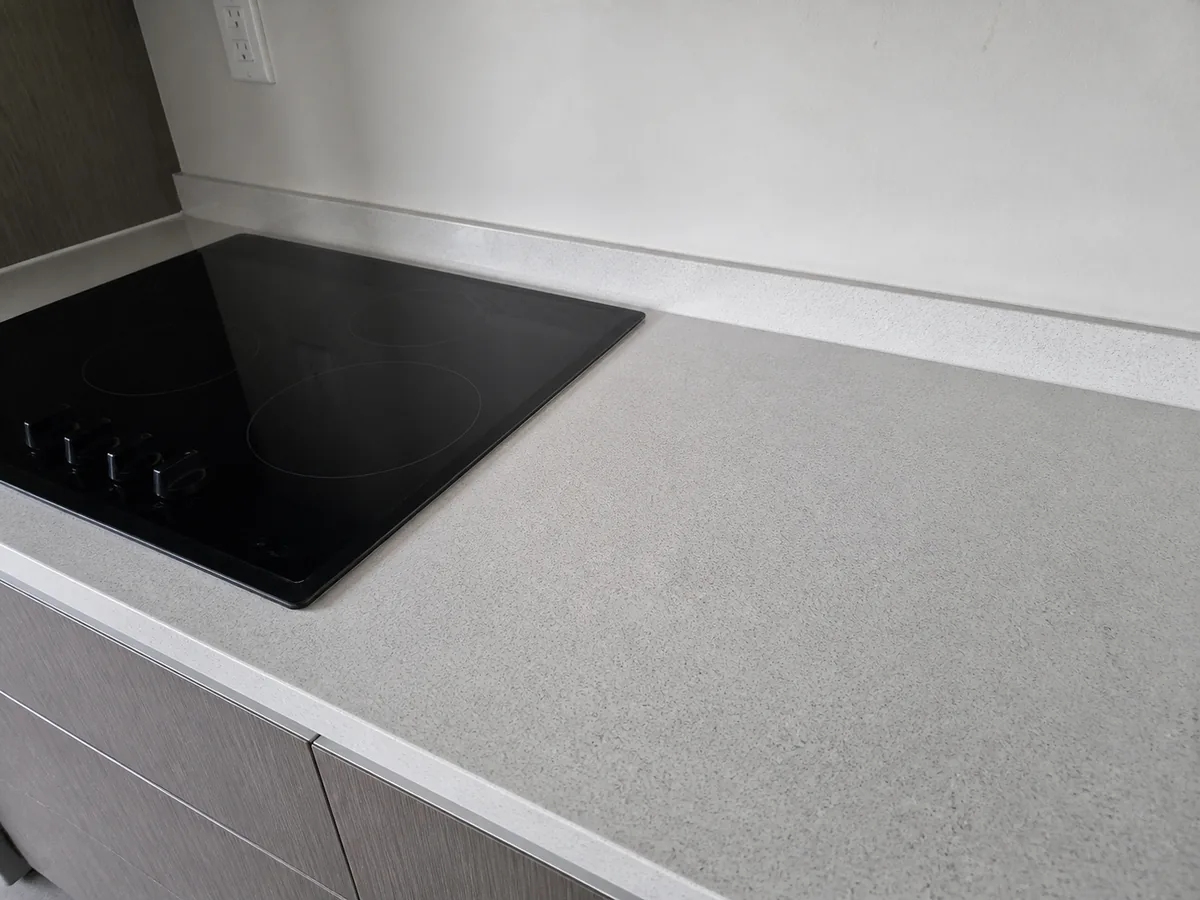
The same feature, graded twelve months apart against the same list. Put the two side by side and there is nothing left to argue about.
Move-in — 12 Mar 2025
Good
Move-out — 12 Mar 2026
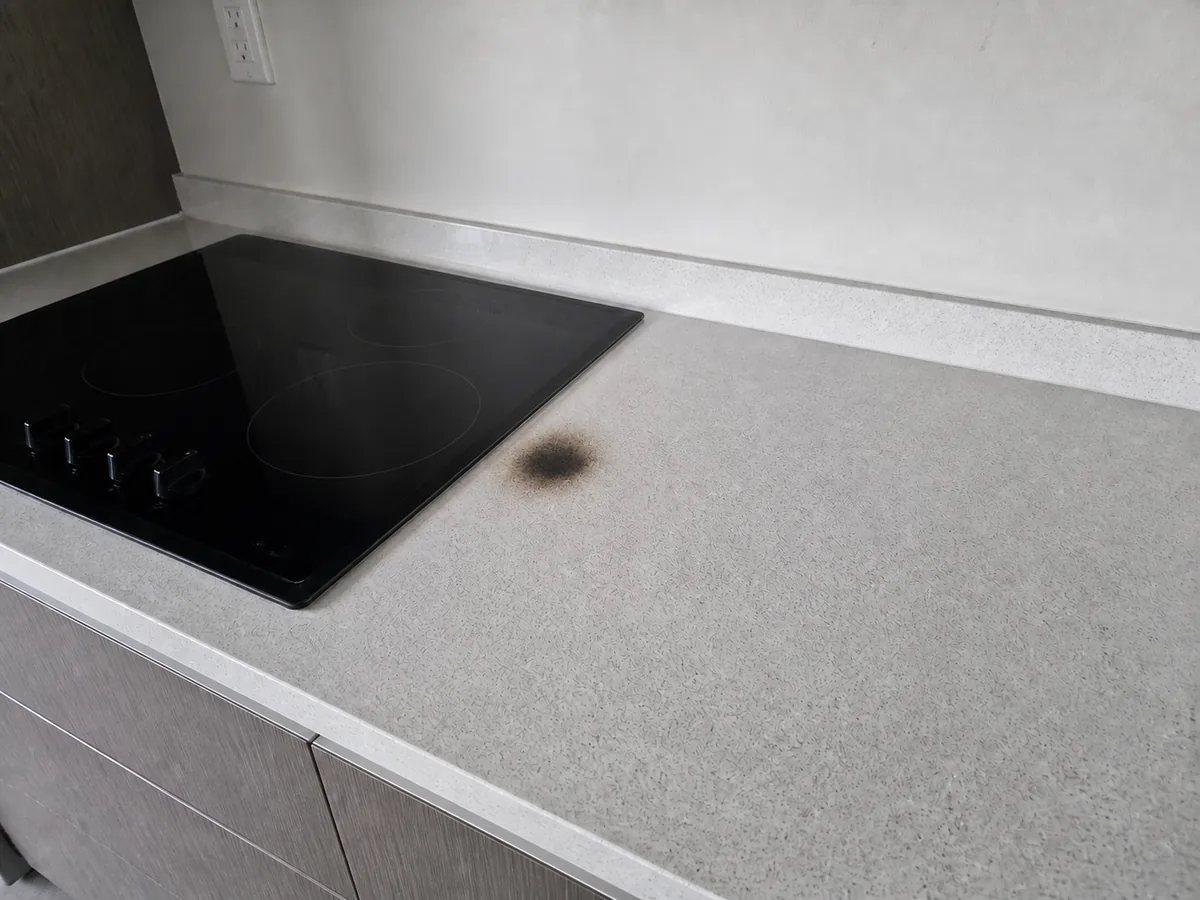 Bad
Bad
Countertops
Changed- Area
- Kitchen
- At move-in
- Good
- At move-out
- Bad
- Photos
- 4 dated
- Both signed
- Yes
You read the two reports against one another; Alto does not yet compute the difference for you.
Worth knowing
How much of your clients' money rides on your records each year?
Most teams have never added it up. Every deposit you hold is a decision you will have to justify with whatever documentation exists at the time.
Deposits you will rule on this year
$972,000 MXN
Move-outs to settle: 54. Each one is settled on the strength of what was written down at move-in — or given back in full because nothing was.
Put the next one on the recordHow it works
Set the property up once. The two visits that matter then run the same way, every tenancy.
-
1
Inspect
Walk the property and grade every feature from your team's own catalogue of areas, with photos and comments as you go.
-
2
Sign
The tenant reviews the grades and photos and signs on the device, before the keys change hands.
-
3
Report
A PDF is generated server-side from what was recorded on site, and sent from the phone before you have left.
-
4
Compare
Twelve months later the same list comes up again, so the move-out reads against the move-in feature by feature.
The system of record
Structured, not a folder of photos
- Property
- 14 Calle Reforma
Apt 3B - Area
- Kitchen
- Feature
- Countertops
- Recorded
- 12 Mar 2026
10:42 CST - Grade
- Bad
- Signed
- Sample signature
Every photo, comment and signature is time-stamped and stored against the property.
Inspection MI-01842-050124
When the deposit is disputed
What makes a deduction stick
Deposit disputes are decided on the quality of the move-in and move-out documentation. These are the things that decide them — and the reasons the app is shaped the way it is.
- One item, one line
- A claim for a scratched countertop is answered by the line about the countertop. A deduction is only as defensible as it is specific.
- Dated, not just taken
- Every inspection carries the date and time it was recorded and who completed it, and every signature is printed with the signee's name and the moment they signed. Undated photographs from a phone are the first thing an opposing party goes after.
- Obviously of the right thing
- A photograph only helps if nobody can argue about what it shows. Each is attached to the feature it documents rather than dropped into a folder, so the report can point at it by name.
- Agreed, not asserted
- A signature from the tenant at move-in turns your account of the condition into a shared one. That is the difference between evidence and an opinion.
- Like for like
- Both visits grade the same catalogue, so nobody has to argue about whether two documents describe the same property before arguing about its condition.
- Still there when you need it
- The record belongs to the team, not to the inspector who happened to do the walkthrough. Staff change over a twelve-month cycle; the evidence does not leave with them.
Alto Inspect records what was found and who agreed to it. What you may withhold, and the deadlines you have to work to, depend on your lease and your jurisdiction — take advice on those.
The deliverable
A document that settles the argument
Generated from what was recorded on site — not retyped from memory a day later. Every report carries:
- The property address and the date and time the inspection was recorded
- Every area inspected, with each feature graded and colour-coded
- Comments and photo counts against the individual features they describe
- Within each area, the worst-rated features first, so nothing important is buried at the bottom
- The signature of everyone who signed off on the day, and who completed the inspection
Sent on from the phone to whoever needs a copy, over a private link that expires.
Ask for a sample report on the call
1. Executive summary
48
Items
36
Good
8
Neutral
4
Bad
2. Observations
| Area / feature | Photos | Grade |
|---|---|---|
| Kitchen · Countertops | 4 | Bad |
| Kitchen · Flooring | 1 | Neutral |
| Bathroom · Walls | 2 | Good |
6. Tenant signature
I have reviewed this inventory and acknowledge that it reflects the condition of the property on the date and time above.
J. Reyes · 12 Mar 2026, 11:02 CST
Built for
Whoever holds the deposit
Property managers
A searchable record of every unit and visit, so the portfolio holds up when staff change over.
Brokerages letting units
Every agent inspects against the same list, so the owner gets the same document whoever did the walkthrough.
Independent landlords
A few units, but the same exposure. One careful walkthrough a year protects the deposit you are holding.
Relocation & corporate housing
Short handovers, high turnover, a client to report to. The inventory is the handover document.
Priced per unit, not per argument
One deduction you can actually defend usually covers a year of the units it came from. We onboard teams directly, so the price you are quoted includes setting up your catalogue and training your inspectors.
- Unlimited inspections and photos on every unit
- Every inspector on your team, at no extra seat cost
- Setup, your area catalogue and onboarding included
From
$49 MXN
per unit, per month
Volume pricing above 100 units. Quoted on the call, once we know how your team inspects.
Get a quote for your portfolioFrequently asked questions
Straight answers about what the product does today.
How does the tenant actually agree to the inventory?
They sign on the device before the keys change hands, with the grades and photos in front of them. The report prints each signature with the signee's name and the moment it was taken. It evidences who signed off on the day; it is not legal advice, and what you can withhold depends on your lease and your jurisdiction.
What if the tenant will not sign, or nobody else is there?
The inspection still records normally — grades, comments and dated photographs — and you can capture signatures from whoever is present, or none at all. A record only you signed is weaker than one you both did, which is exactly why the app puts signing in front of you before you leave rather than leaving it to be chased afterwards.
Can we compare the move-out against the move-in?
Both inspections grade the same catalogue of areas and features for that property, so they read directly against one another feature by feature, and both sit in the property's history. The app does not yet generate a side-by-side difference for you — you read the two reports together.
Can we use our own areas and checkpoints?
Yes. Your team keeps its own catalogue of areas and the features checked within them, and properties are built from that catalogue — so a two-bedroom apartment and a warehouse can be inspected with the same app, each against a list that makes sense for it.
How does the report reach the tenant and the owner?
Generating the report opens your mail app with the message ready to go, carrying a private link to the report that expires after a set period. Add whichever recipients you need and it sends from your own address, so replies come back to you.
How do we get started?
We are onboarding teams directly at the moment. Book a call and we will set up your team, load your area catalogue and walk your inspectors through their first move-in inventory.
Put your next move-in on the record
Fifteen minutes, screen shared. Tell us how your team inspects today and we will show you the same walkthrough in the app, and quote your portfolio.
- A real move-in inventory, walked end to end
- A sample PDF report to keep
- A price for your portfolio, on the call
Prefer email? [email protected]
Book your demo
Five fields. No card, no trial to activate.